For website owners who never have time for social media

Paste your website. Get a month of social posts.

MagpieFeed plans a month of posts from what is on your site, and you review every post before it is shared.

  • No account
  • No card
  • Free for 3 channels and 30 posts a month
See how it works

The other way to use it: write one post, send it to several networks

Screenshot of the MagpieFeed post composer, where you write one post yourself: Instagram, Facebook and Bluesky ticked, and the post's caption and photo previewed for each network

Or write one post yourself, in the composer.

Rather listen? Narrated intro (MP3) · Tutorials

Publishes to these networks

  • LinkedIn personal profile, every plan
  • Bluesky every plan
  • Mastodon every plan
  • Telegram every plan
  • Discord every plan
  • Facebook Pages After review
  • Instagram After review
  • Threads After review
  • YouTube Shorts After review
  • Pinterest Soon
  • TikTok Soon
How posts go out

Posts you write yourself go out at the time you pick. Posts planned from your website wait for your approval. For an account you connect and allow auto-send for, approved posts go out on their own at their time.

Facebook Pages, Instagram, Threads and YouTube Shorts: MagpieFeed will publish to these for you once Meta and Google have reviewed it. Until then, share to them in one tap.

Coming soon: Pinterest and TikTok. X and WhatsApp, and anywhere else: share in one tap.

Network names and logos belong to their owners and are shown only to say where MagpieFeed can publish.

  • 5networks you can publish to from one place
  • 9ready-made post designs, each in your logo and colours
  • 30days of posts you can plan from one web address
  • 3channels on the Free plan, no card

How it works.

  1. Paste your website

  2. Review your drafts

  3. Posts go out on time

What happens at each step
  1. Paste your website address

    MagpieFeed reads your pages (up to 15 of them) and shows you what it found: your business name, tone and the topics it would post about. Change anything you do not like. It takes about forty seconds.

  2. Choose how often, and when

    Pick one to three posts a day, the times, the days of the week and your time zone. You see the first 7, 14 or 30 days laid out on a calendar before you sign up. After you sign up the plan keeps going on that schedule, and you can edit it.

  3. Review the drafts in your queue

    Create a free account and the drafts reach your queue a few days before their date. Each draft waits for your approval. Edit the caption, skip it, or share it in one tap. Nothing goes out until you approve it, or until you allow auto-send for an account you have connected.

Rather write your own? Connect your accounts, write one post, tick the networks and pick a date and time. A post you write publishes on schedule, at the time you chose, to every account you ticked.

What you get as a website owner.

  • Your own words

    Posts written from your own pages

    Every draft links to the page it came from.

  • Consistency

    A steady plan, no daily effort

    Set the days and times once.

  • Control

    You say yes first

    Auto-send is off for every account until you turn it on.

  • Your own posts

    One post, many networks

    Write once, tick your accounts, pick a time.

  • Cost

    Free to start

    3 channels, 30 posts a month.

Your posting schedule

Your posting schedule.

You set the schedule before you sign up, and you can see the posts on a calendar first. If you change nothing, you get 2 posts a day, at 09:00 and 18:00, and the plan keeps going after the first 30 days. You can change the schedule from your account whenever you like.

What you choose

  • First look: 7, 14 or 30 days on the calendar.
  • Posts a day: 1, 2 or 3.
  • Days: every day, weekdays, or the days you pick.
  • Times: a time for each post of the day.
  • Time zone: yours, so the times mean what you expect.

What happens next

  • The plan keeps adding days on the same schedule. If your site has too little new material, a slot stays empty rather than being filled with an invented post.
  • Schedule changes apply from tomorrow. Posts already written move to the new times where they can.
  • You can pause the plan at any time, and move any post to another time on the Calendar.
  • If drafts sit untouched for 7 days, the plan pauses itself until you come back.

A post you write yourself

It takes its own date and time, set when you write it, in your account's time zone. Post it now or schedule it for later.

From one web address to a month of posts.

All examples come from demo sites we built, not customers.

Sample posts from a demo shop

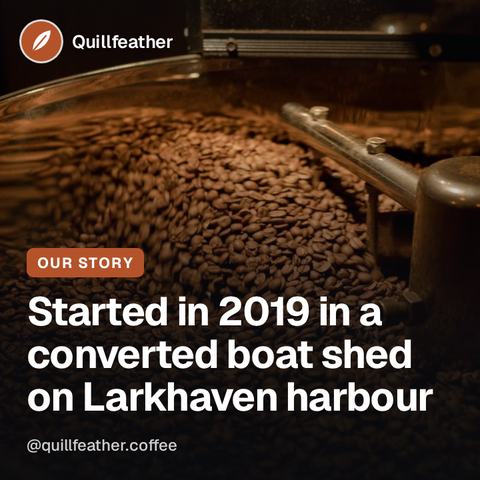
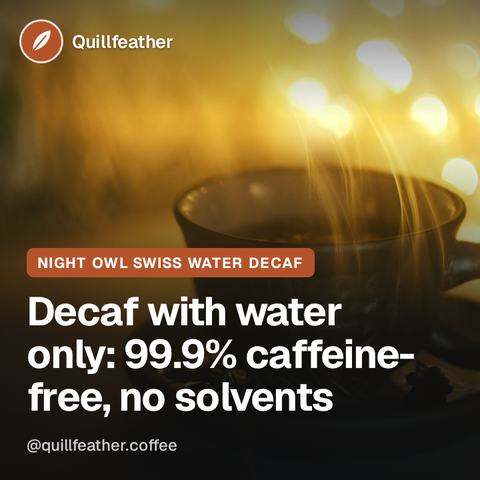
Instagram post for Quillfeather Coffee Roasters: a steaming dark cup on a saucer in warm evening candlelight, the headline “Decaf with water only: 99.9% caffeine-free, no solvents”
Product / service spotlight

Night Owl Swiss Water Decaf is for the evening cup that still tastes like coffee. It is decaffeinated with water only, no solvents.

Full caption

Night Owl Swiss Water Decaf is for the evening cup that still tastes like coffee. It is decaffeinated with water only, no solvents. In the cup you get brown sugar, stewed plum and a round, full body. It is 99.9% caffeine-free.

If you want a decaf that holds its own after dinner, this is the one to try. Link in bio.

Where this came from
Source page: demo-roastery.magpiefeed.com/shop/night-owl-decaf/
Decaffeinated with water only, no solvents. Brown sugar, stewed plum and a round, full body. For the evening cup that still tastes like coffee.

Word for word from that page. Each post is written from lines on the website like this one.
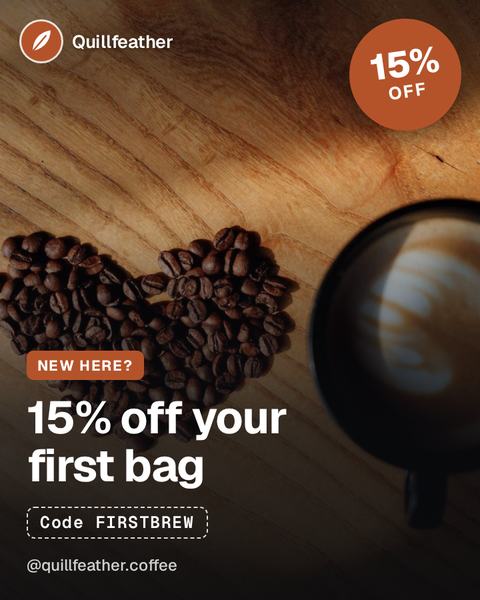
Instagram post for Quillfeather Coffee Roasters: a latte beside a heart of coffee beans on a sunlit wooden table, a “15% off” badge, the headline “15% off your first bag”, and the code FIRSTBREW
Offer

New to Quillfeather? Use code FIRSTBREW at checkout and we take 15% off your first order.

Full caption

New to Quillfeather? Use code FIRSTBREW at checkout and we take 15% off your first order. That covers every coffee in your basket, including the Pour-Over Starter Kit. One use per customer.

Link in bio

Where this came from
Source page: demo-roastery.magpiefeed.com/offer/
Use the discount code FIRSTBREW on your first order and we take 15% off every coffee in your basket, including the Pour-Over Starter Kit. One use per customer, on your first order only.

Word for word from that page. Each post is written from lines on the website like this one.
Your website is next.

Turn my website into posts

Three things it does for you.

  • Writes from your site

    Drafts come from what is already there.

  • Waits for your OK

    Edit, skip or move any draft.

  • Or write your own

    One post, several networks, your time.

The details

Writes

Posts written from your own website

Paste your web address. MagpieFeed reads your pages and drafts posts from what is on them: your products, tips, offers and questions. If your site has no offer, you do not get an offer post. Add your logo and colours once and the post images use them.

Waits

You decide what goes out

Drafts are prepared and scheduled for the days and times you chose, then wait in your queue. Edit the words, change the design (nine ready-made ones to pick from), skip a post, or move it on the Calendar. Nothing from your website is posted until you approve it. If you allow auto-send for a connected account, drafts for that account are approved for you and go out at their time.

Schedules

Or write a post yourself

Write it once, tick your channels and pick a time. Each network gets its own copy at that time, and you can see whether it went out.

Start free. Upgrade when you need more.

EUR / month, excl. VAT · 20% off yearly

  • Free

    Publish to 3 channels on 5 networks, others in one tap

    For trying MagpieFeed on your own website.

    €0

    No card needed.

    • 30 posts a month
    • 3 channels on LinkedIn (personal profile), Bluesky, Mastodon, Telegram and Discord
    • Every other network: we get each post ready, you press Post
    • 5 Shorts a month
    Start free
  • Solo

    Recommended

    Publish to 10 channels, with more posts and feeds

    For a small business that posts regularly.

    €9/ month

    or €7.20/month paid yearly

    • 500 posts a month
    • 10 channels on LinkedIn (personal profile), Bluesky, Mastodon, Telegram and Discord
    • 20 video clips and 60 Shorts a month
    • 3 product or blog feeds
    Get Solo
  • Pro

    Publish to 25 channels, plus the API

    For a busier business that wants more posts and the API.

    €19/ month

    or €15.20/month paid yearly

    • 1,500 posts a month
    • 25 channels on LinkedIn (personal profile), Bluesky, Mastodon, Telegram and Discord
    • 60 video clips and 300 Shorts a month
    • 10 product or blog feeds and the public API
    Get Pro
Compare all plans →

Questions, answered.

More questions about plans →
What is MagpieFeed?

You give it your website address. It reads your pages and drafts social media posts from what is on them. You look through the drafts, edit or skip any of them, and approve the ones you like. You choose which channels the plan sends to; anything else you share yourself in one tap. You can also write a post yourself and schedule it to all your channels at once.

What do I need to give you?

Only your website address, to see your plan. No account and no card for that. To keep the plan you make a free account with an email and a password. To publish to your own accounts, you sign in to each network from MagpieFeed.

Does anything go out without my approval?

A post you write and schedule yourself publishes on schedule, at the time you pick. A post MagpieFeed drafts from your website waits for your approval in your queue. You edit it or skip it, then approve it or post it yourself in one tap. If you connect an account and allow auto-send for it, drafts for that account are approved for you and go out at their time. Auto-send is off for every account until you turn it on, and you can turn it off, or pause the whole plan, at any time.

How often will it post, and can I choose?

Yes. Before you sign up you choose how many posts a day (1 to 3), the time of each one, the days of the week and your time zone, and you see the first 7, 14 or 30 days on a calendar. The plan then keeps going on that schedule, and you can edit it or pause it at any time. You can also move any single post on the Calendar. Free includes 30 posts a month, counted once for each network, so at 2 posts a day on 2 networks it lasts about 7 days. A paid plan, fewer networks or fewer posts a day make it last longer. Posts you write yourself have their own date and time.

Will it work with my website?

It works with any public website: a shop, a blog, a local business or a news site. You install nothing on your site. MagpieFeed reads up to 15 of your public pages and follows your robots.txt. If your site has little to say, some days are left empty instead of being filled with made-up posts.

Which networks can I post to?

MagpieFeed publishes for you to LinkedIn, Bluesky, Mastodon, Telegram and Discord, on every plan. Facebook Pages, Instagram, Threads and YouTube Shorts come next: we will publish to them for you once Meta and Google have reviewed MagpieFeed, and until then you share to them in one tap. Pinterest and TikTok are coming soon. For X and WhatsApp and any other network, MagpieFeed copies your caption and opens that network's own post box so you can post it in one tap.

Do I need a developer account or an app of my own?

No. You connect each account by signing in, or with a bot token or app password, and MagpieFeed publishes for you itself. Nothing goes through another posting service.

What does it cost?

The Free plan costs nothing and needs no card. It includes 3 channels on LinkedIn, Bluesky, Mastodon, Telegram and Discord, 30 posts a month (counted once for each network a post goes to), the 30-day plan from your website, and every export. Paid plans add more networks, accounts and posts. The prices are in the plans above. Auto-send is available on every plan, within the posts a month and the networks your plan includes.

Paste your website. See your month of posts.

One web address. No account, no card. Nothing is posted until you approve it, or allow auto-send for an account.